

Build a succession pipeline
What this achieves
Section titled “What this achieves”Succession planning names the people who could take over your most important roles, and scores how close each of them is. Its most useful output is the list of critical positions with nobody ready — the roles you would struggle to fill tomorrow.
Required role: Administrator.
Before you start
Section titled “Before you start”The screen states what it needs: critical positions that carry a job profile, and nominated candidates. Two things have to be in place first.
- The positions you care about are marked as critical.
- Those positions have a job profile stating what the role requires, so a candidate can be scored against it.
Without both, the screen stays empty regardless of how many people could do the job.
- Go to Talent & Growth → Insights → Succession.
- Read the Succession Pipeline at the top, then the critical-gap panel beneath it.
- Select a position in the Positions list.
- Select Nominate.
- Search for the employee by name and select them.
- Add Notes (optional) giving the reason for the nomination.
- Select Nominate.
Reading the pipeline
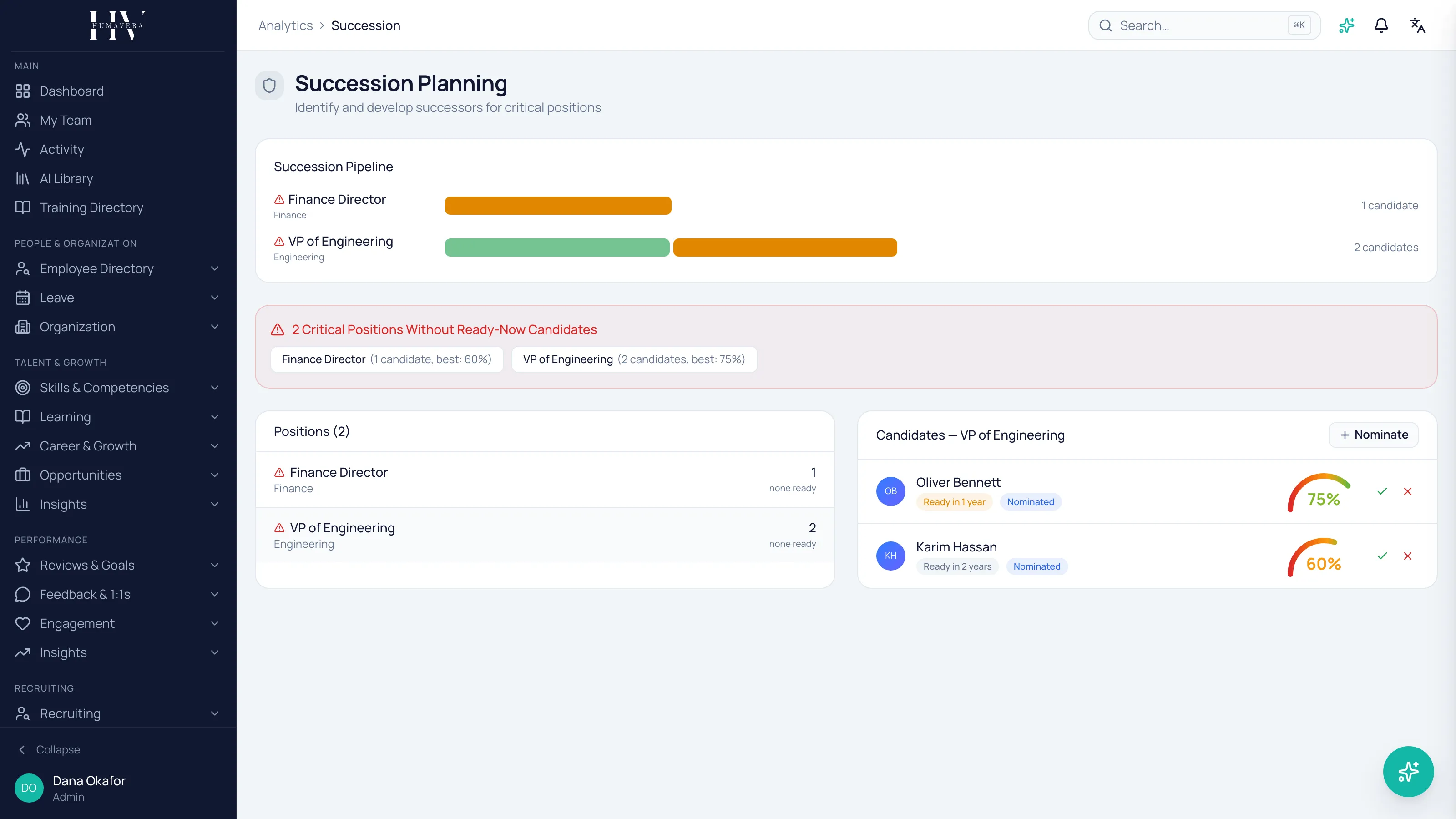
Section titled “Reading the pipeline”Each row is a position. The bars beside it are its candidates, coloured by readiness category and sized by score, with the candidate count at the end. A position with no candidates shows that plainly instead of showing an empty bar.
The pipeline draws up to five candidates per position. Where a position has more, open it in the Positions list to see them all.
Example: a Head of Engineering position at HC Corp showing three green bars is covered. The same position showing one short amber bar is a risk, and it is a more urgent finding than any skill gap on the same screen.
Critical positions without ready-now candidates
Section titled “Critical positions without ready-now candidates”The panel below the pipeline is the part to act on. It counts critical positions that have nobody in the Ready Now category, and lists each one with how many candidates it has and the best score among them.
That distinction matters. A critical position with four candidates and a best score of 55% is on this list, and it should be — four people who are not ready is not cover.
Example: if a critical Finance position at HC Corp shows two candidates with a best score of 60%, the answer is a development plan aimed at the specific requirements those two are missing, not another nomination.
Select any position in the panel to jump straight to its candidates.
The positions list
Section titled “The positions list”Each row shows the position, its department, its candidate count, and either how many are ready or none ready. Critical positions carry a warning marker.
none ready is the phrase to scan for. It means the position has candidates but none of them is currently Ready Now.
Approving or rejecting a candidate
Section titled “Approving or rejecting a candidate”A nomination starts as nominated. Beside a nominated candidate, a tick approves them and a cross rejects them.
| Option | Description |
|---|---|
| Nominated | Proposed, not yet decided. |
| Approved | Accepted as a successor for this position. |
| Rejected | Not accepted for this position. |
Approving somebody is a statement about a role, not a promise to a person. Nothing on this screen is visible to the candidate, and nobody should learn they are on a succession list from a system rather than from their manager.
Example: approving James Whitfield as a successor at HC Corp records that the company has cover for a role. Whether he is told, and what he is told, is Olivia Bennett’s conversation to have.
Readiness scores come from elsewhere
Section titled “Readiness scores come from elsewhere”The score and category shown against each candidate are readiness scores against the position’s job profile. They are calculated when a score is generated and carry that date — they do not update because the person learned something new this week.
If a candidate’s score looks wrong, the fix is in their skills and the profile’s requirements, not on this screen.
What happens next
Section titled “What happens next”The critical-gaps list is the input to development planning: each gap names a role, and the candidates’ readiness detail names the requirements missing. Where no internal candidate is plausible, this is the point at which succession becomes a recruiting question rather than a development one.
Related
Section titled “Related”© 2025-2026 Humavera Documentation - BPilot Ltd. All Rights Reserved