

Read consolidated reports
What this achieves
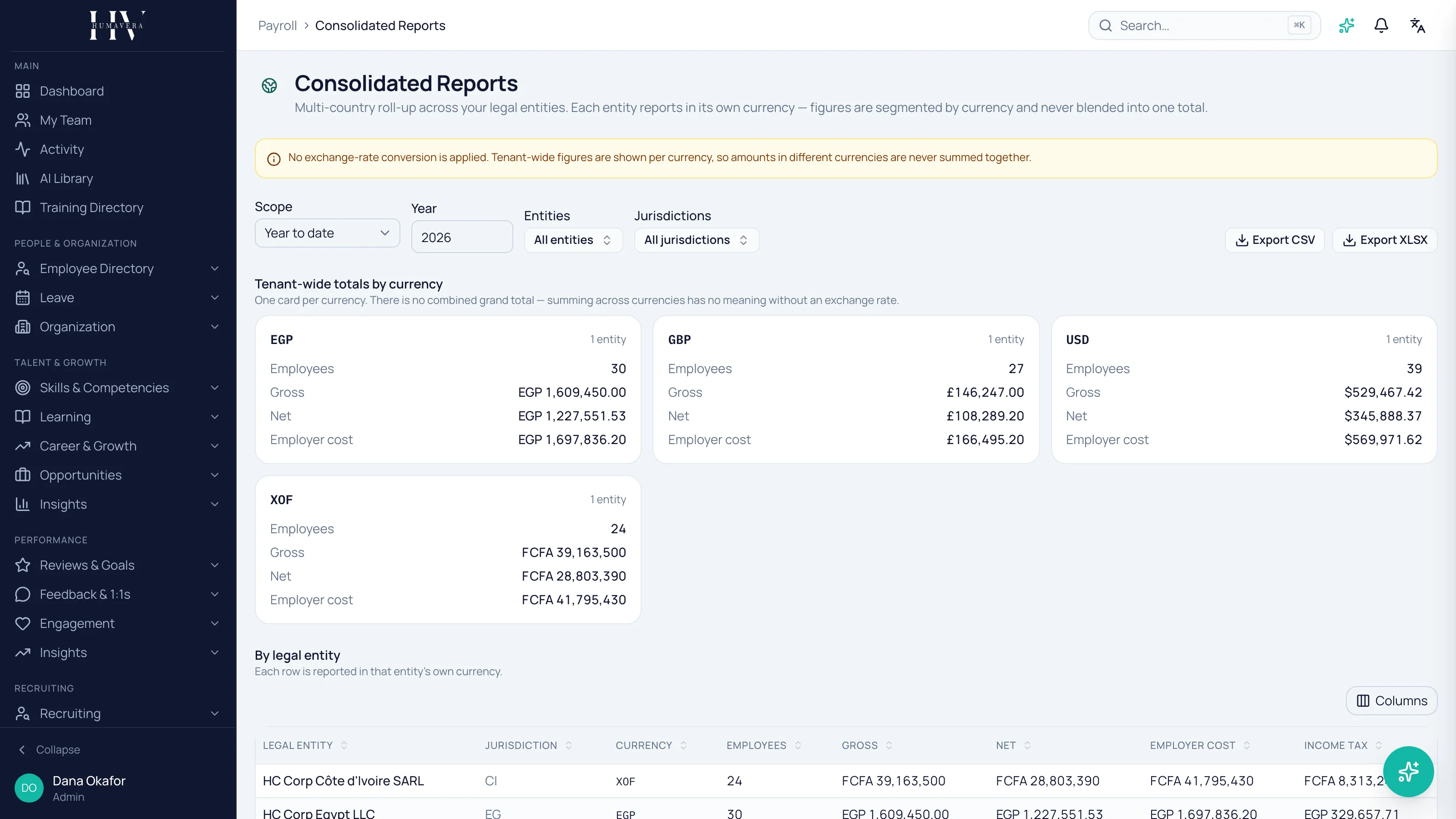
Section titled “What this achieves”Consolidated reporting rolls finalised payroll up across your legal entities, so a company operating in more than one country sees its whole payroll position. Each entity reports in its own currency, and figures are segmented by currency rather than blended.
Required role: Administrator.
- Go to Payroll → Consolidated Reports.
- Choose the Scope — Year to date or Single month.
- Set the Year, and the Month if you chose a single month.
- Optionally filter by Entities or Jurisdictions.
- Read the totals, or select Export CSV or Export XLSX.
There is no grand total, by design
Section titled “There is no grand total, by design”This is the thing to understand before reading anything on the screen. Tenant-wide figures are shown as one card per currency, and there is no combined total across them.
No exchange-rate conversion is applied anywhere in Humavera. Summing across currencies would require a rate, and any rate chosen would be wrong by the time someone read the number — so the product does not choose one.
Example: HC Corp employs through four entities, so its roll-up shows four currency cards — HC Corp UK Ltd in GBP, HC Corp Inc. in USD, HC Corp Côte d’Ivoire SARL in XOF, and HC Corp Egypt LLC in EGP. There is no fifth figure combining them, and that absence is deliberate rather than missing.
If your finance team needs a single consolidated figure, they apply their own rate outside Humavera, at a date and a source they can defend.
How the report is broken down
Section titled “How the report is broken down”| Option | Description |
|---|---|
| Tenant-wide totals by currency | One card per currency, covering employees, gross, net, and employer cost. |
| By legal entity | One row per entity, each reported in that entity’s own currency. |
| By jurisdiction | Subtotals per jurisdiction, split by currency within each one. |
| Option | Description |
|---|---|
| Year to date | Everything finalised so far in the chosen year. |
| Single month | One month of the chosen year. |
Year to date is the one to use for a position; single month is the one to use when reconciling a specific period against your accounts.
Filters
Section titled “Filters”Entities and jurisdictions can both be filtered, and both default to all. Filtering by jurisdiction rather than entity is the quicker route when you want a country’s position and that country has more than one entity in it.
What happens next
Section titled “What happens next”Consolidated figures are read-only reporting built from finalised runs — nothing here changes payroll. Export to CSV or XLSX when the numbers need to leave Humavera for a board pack or a statutory filing, and note the currency on anything you circulate, since the figures are only meaningful with it attached.
Related
Section titled “Related”© 2025-2026 Humavera Documentation - BPilot Ltd. All Rights Reserved