

Build and publish a roster
What this achieves
Section titled “What this achieves”The schedule board is where open shifts are assigned to people and coverage is checked as you work. Publishing tells employees their shifts; locking is what stops the schedule changing afterwards.
Required role: Administrator or Manager.
Before you start
Section titled “Before you start”Create your shift templates and coverage rules first. A pattern can generate a draft for you to start from, which is usually faster than placing every shift by hand.
- Go to Time & Attendance → Shifts.
- Select a schedule, or select New schedule and set its Name, Start, and End.
- Select Add shift to create an open shift from a Template on a Day, then Create.
- Drag the open shift onto an employee to assign it.
- Watch the Coverage band as you assign.
- Select Publish when the roster is ready.
- Select Lock once the schedule should stop changing.
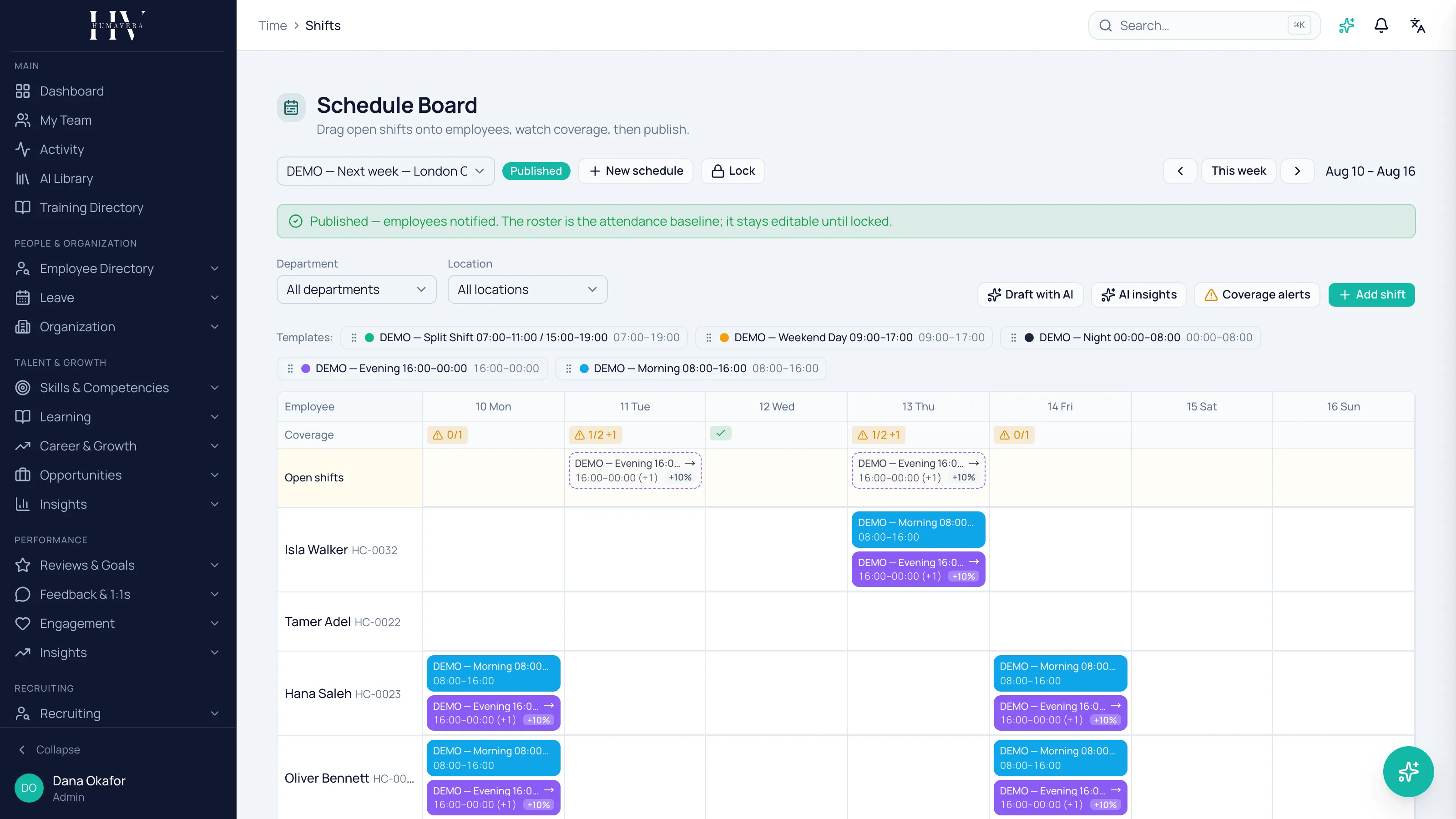
Publishing is not the same as locking
Section titled “Publishing is not the same as locking”This is the distinction that matters most on this screen, and it is easy to assume the wrong way round.
| Option | Description |
|---|---|
| Publish | Employees are notified and the roster becomes the attendance baseline. It stays editable. |
| Lock | The schedule becomes read-only and stops changing. |
Example: Priya Raman publishes HC Corp UK Ltd’s warehouse roster on Friday so the team can plan. A shift still needs moving on Monday — that edit is possible, because the schedule is published but not locked. She locks it once the week is settled.
Publishing also runs a reconcile pass across the schedule’s days against the roster. Days that cannot be reconciled retry on the next sweep rather than failing outright.
Some assignments are refused outright
Section titled “Some assignments are refused outright”Coverage is a warning. The scheduling rules are not: an assignment that breaks one is refused, and the shift snaps back where it was. Humavera names what was broken.
| Option | Description |
|---|---|
| Double-booked | The employee already has a shift covering that time. |
| On approved leave | The employee has approved leave on that day. |
| Over max weekly hours | The assignment would take the employee past their weekly hour limit. |
These three cannot be overridden on the board. To place the shift you have to deal with the cause — move the other shift, or reach the employee’s leave — rather than confirm past a prompt.
Example: dragging a Saturday warehouse shift onto Tom Hargreaves while his leave for that day is approved is refused. The board does not ask Priya Raman to confirm; the shift returns to where it was.
Softer problems behave the opposite way. Where an assignment carries a warning rather than a rule breach, it goes through and the shift is marked, so the roster shows what you accepted rather than blocking you.
Coverage gaps warn, they do not block
Section titled “Coverage gaps warn, they do not block”The coverage band shows each slot as met or short as you assign. If understaffed slots remain when you publish, Humavera asks you to confirm and offers Publish anyway — gaps are a warning, not a block.
That is deliberate. A roster that cannot be published because nobody is available helps nobody; a published roster with a visible gap is honest about the problem.
Example: if HC Corp UK Ltd’s evening warehouse band is short and no qualified person is free, publishing anyway gets the roster to the team with the shortage still flagged.
Open shifts and claiming
Section titled “Open shifts and claiming”An open shift is one nobody is assigned to yet. A schedule can be set so that claiming an open shift requires approval, using Require approval to claim open shifts when creating it.
With approval required, an employee claiming a shift raises a request rather than taking it. Without it, they take it directly.
Coverage alerts and AI insights
Section titled “Coverage alerts and AI insights”Two panels sit alongside the board, and both are read-only.
| Option | Description |
|---|---|
| Coverage alerts | Gaps detected when leave was approved, with a ranked list of who could cover. It assigns nobody. |
| AI insights | A plain-language read of where coverage is short, met, or over-staffed across the schedule. |
AI insights are grounded on the computed staffing numbers and change nothing in the schedule. Generating them consumes AI credits, and the panel states the cost before you run it.
Neither panel schedules anyone. They are analysis of a roster you build and publish yourself.
What happens next
Section titled “What happens next”A published roster is the baseline attendance reconciles against, so what employees are expected to work is what their day is judged against. Employees see their shifts in their own schedule, where they can request a swap or give a shift away. Lock the schedule once it should stop moving.
Related
Section titled “Related”© 2025-2026 Humavera Documentation - BPilot Ltd. All Rights Reserved