

Enrol and assign learners
What this achieves
Section titled “What this achieves”Enrolling puts an employee onto a course or a learning path so it appears in their own learning. Whether that happens immediately depends on what the course costs.
Required role: Administrator. Managers can assign training to their own reports.
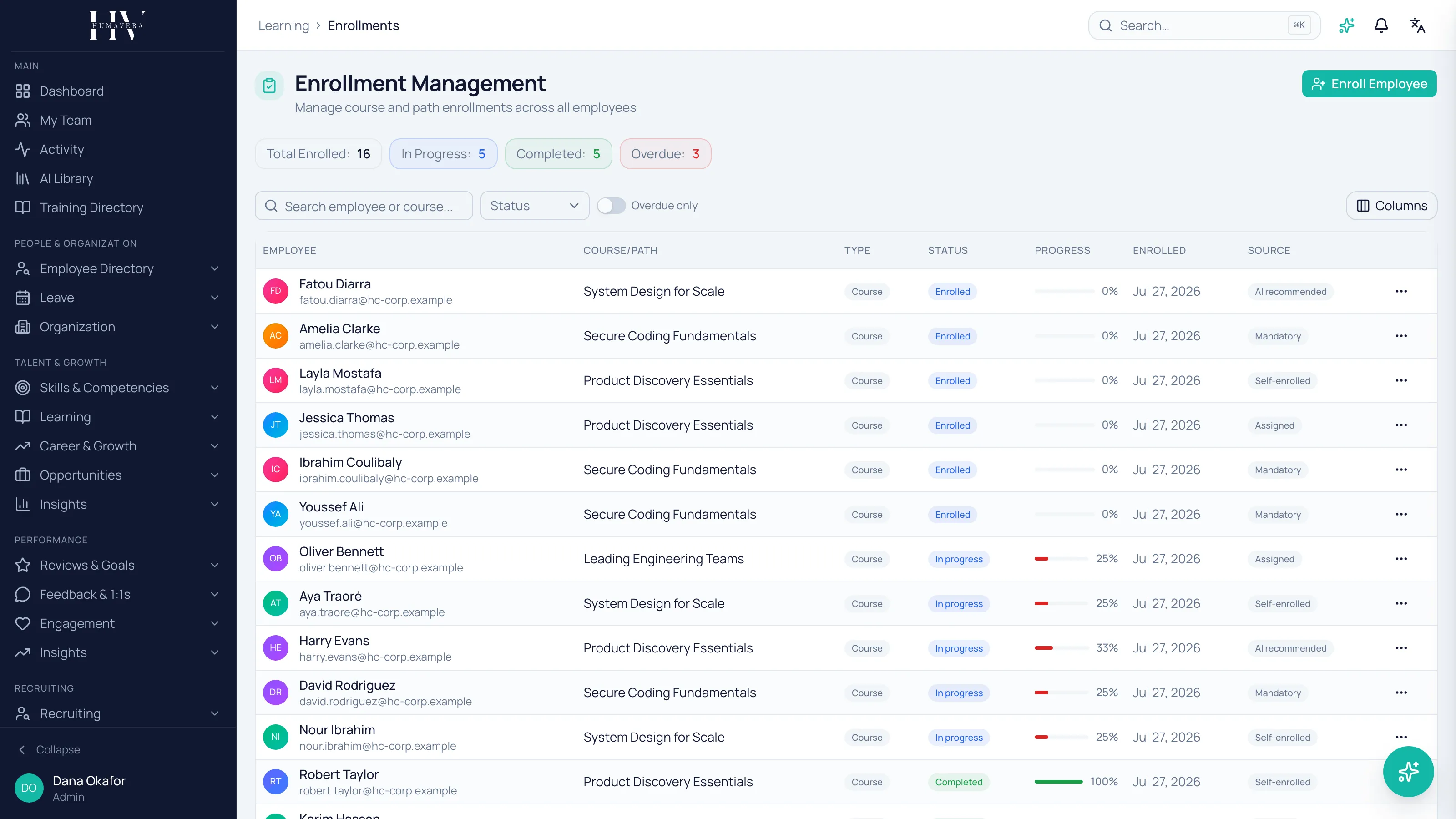
- Go to Learning → Enrollments.
- Select Enroll Employee.
- Choose the employee and the course or learning path.
- Confirm.
Cost decides whether approval is needed
Section titled “Cost decides whether approval is needed”This is the rule to understand before assigning anything.
| Option | Description |
|---|---|
| Free or internal | The employee is enrolled immediately. |
| Paid | The request routes for approval before enrolment. |
The assign dialog says which path a given course will take before you submit, and the action changes accordingly — you either enrol or request approval.
Example: Olivia Bennett assigns a free internal course to James Whitfield and he is enrolled straight away. A paid external course for the same person becomes a request that goes for approval, and he is not enrolled until it is granted.
Cost decides this, not the seniority of the person assigning. An administrator assigning a paid course still routes for approval.
Assigning to a report
Section titled “Assigning to a report”A manager assigns training from their team view rather than from enrolment management. The dialog asks for the course, optional target skills, an optional target date, and a reason.
Write the reason. It is what the approver reads on a paid request, and what the employee sees as the purpose of the training.
Example: “Preparing for the senior engineer role — needs the cloud certification” is approvable. A blank reason is a question sent back.
How someone came to be enrolled
Section titled “How someone came to be enrolled”Every enrolment records how it happened, which matters when reporting on whether learning is chosen or imposed.
| Option | Description |
|---|---|
| Self-enrolled | The employee enrolled themselves from the catalogue. |
| Assigned | Somebody enrolled them. |
| Mandatory | Required by a mandatory learning rule. |
| AI recommended | Taken up from a recommendation. |
Tracking progress
Section titled “Tracking progress”Enrolment management lists employees against courses with their status, and can be filtered to overdue only. Statuses are Not Started, In Progress, Completed, Overdue, and Cancelled.
The overdue filter is the one to work from. A long list of not-started enrolments usually means assignment without a conversation; a long list of overdue ones usually means target dates nobody agreed to.
What happens next
Section titled “What happens next”An enrolled learner sees the course in their own learning and can start it. On completion, any skills or competencies the course grants are credited, and a certificate is issued if the course nominates an active certification template.
Related
Section titled “Related”© 2025-2026 Humavera Documentation - BPilot Ltd. All Rights Reserved