

Request leave
What this achieves
Section titled “What this achieves”A leave request books time off and sends it to whoever approves your leave. Submitting it commits the days against your balance straight away, before anyone has decided.
Required role: Any signed-in user.
- Go to Leave → My Requests.
- Select Request Leave.
- Choose the Leave type.
- Set the Start date and End date.
- Add a Reason if you want to, which is optional.
- Attach a file under Attachments if the type requires documentation.
- Check the estimated days and the remaining balance.
- Select Submit.
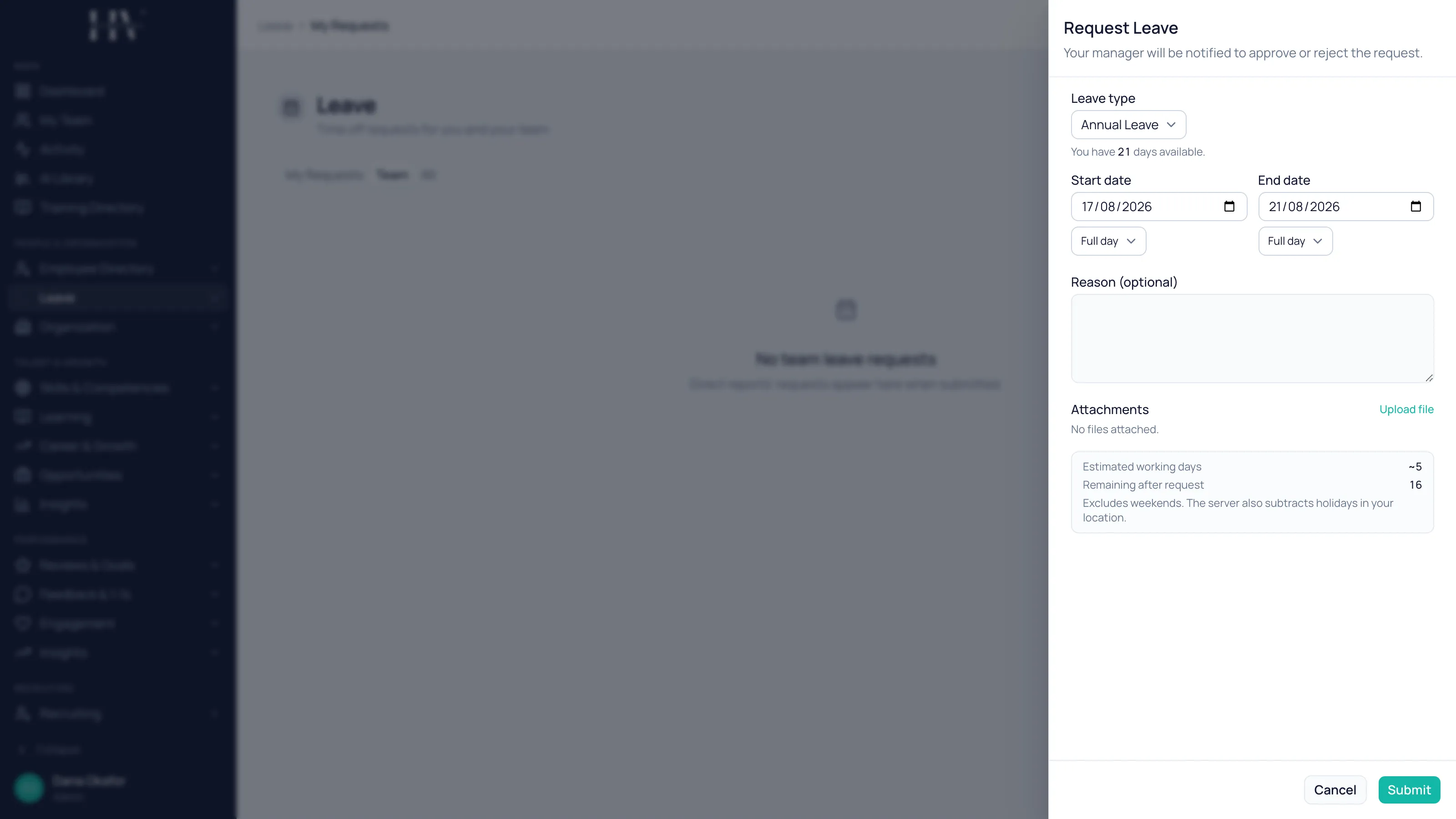
The day count you see is an estimate
Section titled “The day count you see is an estimate”The form shows Estimated working days, and the wording matters. The estimate excludes weekends. The server also subtracts the holidays that apply in your location, and the server’s figure is the one that counts.
Example: if James Whitfield books a week that contains a bank holiday at HC Corp UK Ltd’s London office, the form’s estimate excludes the weekend and the server also removes the holiday — so the request costs him fewer days than the form first suggested.
Two people booking identical dates can therefore use different numbers of days, because holidays are scoped to a location. That is correct behaviour, not an error.
Your balance drops before approval
Section titled “Your balance drops before approval”Remaining after request shows what you will have left. Those days move to a pending state as soon as you submit, so your available balance falls before anyone approves anything.
This stops the same days being booked twice while a request waits. It also means cancelling a request you no longer need returns the days.
If the balance is not enough
Section titled “If the balance is not enough”The form warns that the balance is insufficient and that the server will reject the request. Unless your leave type permits a negative balance, submitting anyway fails.
If you see that no balance is configured for a leave type, an administrator needs to initialise your balances — it is not that your entitlement is zero.
Half days
Section titled “Half days”Where the leave type allows it, a request can be a half day.
| Option | Description |
|---|---|
| Full day | The whole working day. |
| Morning only | The first half of the day. |
| Afternoon only | The second half of the day. |
Documentation
Section titled “Documentation”Some leave types require an attachment once a request passes a length threshold, and the form tells you when that applies. Attach the file before submitting rather than sending it separately, so it stays with the request.
Example: sick leave at HC Corp UK Ltd beyond the configured threshold needs a supporting document; a single day does not.
What happens next
Section titled “What happens next”The request goes to whoever approves your leave, and your manager is notified. You can follow it in your own list, where the timeline shows it as submitted, awaiting decision, and then approved or rejected. If it is rejected, the reason appears in that timeline. While it is still pending you can edit or cancel it.
Related
Section titled “Related”© 2025-2026 Humavera Documentation - BPilot Ltd. All Rights Reserved