

Build your organization
What this achieves
Section titled “What this achieves”A department groups the people who do one kind of work, such as Finance or Engineering. Humavera uses departments to draw your org chart, route approvals to the right person, and group your reporting.
Required role: Administrator.
Before you start
Section titled “Before you start”Departments belong to a business unit, so create your business units first under Organization → Business Units. Business units in turn belong to the legal entities you created in the previous step.
-
Go to Organization → Departments.
-
Select Add Department.
-
Enter the department Name.
Example:
Engineering, one of HC Corp UK Ltd’s five departments. -
Enter the department Code.
Example:
DEP-ENG. The code is a short identifier used in reports and imports. -
Choose the Business Unit this department belongs to.
-
Choose the Parent Department, or leave it as None (top-level).
Example:
Payrollsits beneathFinance, so Finance is the parent and the org chart nests Payroll under it. -
Choose the Head of the department.
Example: Olivia Bennett, Head of Engineering, leads HC Corp UK Ltd’s Engineering department.
-
Enter the Cost Center, if you track costs by department.
-
Select Save.
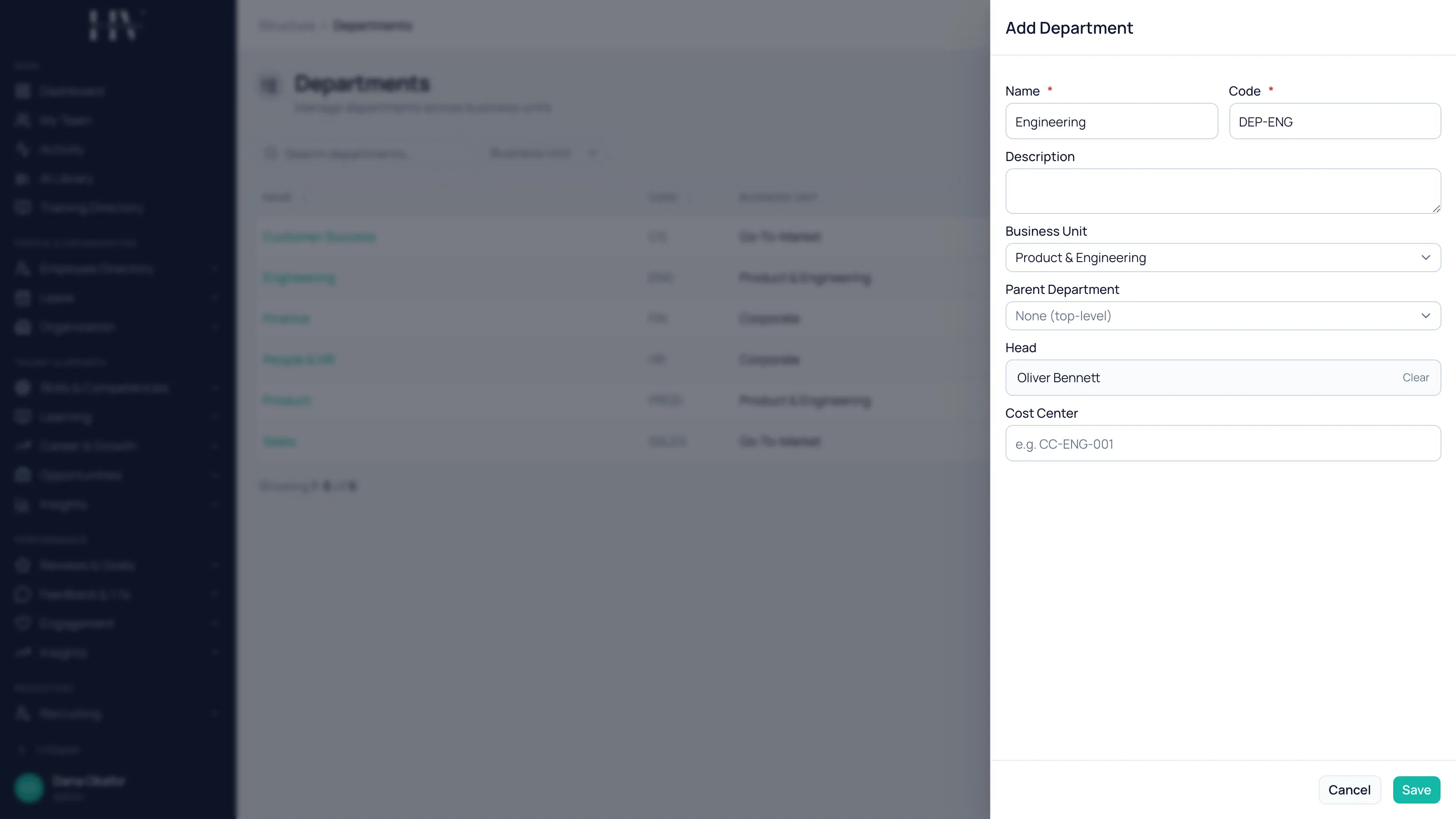
Options on this screen
Section titled “Options on this screen”| Option | Description |
|---|---|
| Name | What the department is called. It appears on the org chart and on every employee assigned to it. |
| Code | A short identifier for the department. Used in reports and data imports. |
| Description | Optional free text explaining what the department does. |
| Business Unit | The business unit this department sits under. |
| Parent Department | The department this one reports into. Choose None (top-level) for a top-level department. |
| Head | The person who leads the department. |
| Cost Center | Optional accounting code for reporting departmental cost. |
What happens next
Section titled “What happens next”The department appears on your org chart and becomes selectable when you add or edit an employee. Repeat this for every department before you load your people, so that each employee can be assigned to the right one as you create them.
Related
Section titled “Related”© 2025-2026 Humavera Documentation - BPilot Ltd. All Rights Reserved